A data room is organized for disclosure, not for review. The seller's counsel has structured the folder hierarchy to demonstrate completeness — to be able to say, in a dispute, that the document was available and accessible. That's not the same as organizing documents so a buyer's team can systematically review the clause stack in 21 days. Understanding that distinction is the first step toward building a VDR review workflow that actually works under time pressure.
This article covers the practical mechanics of organizing a VDR review on platforms commonly used in mid-market M&A — Intralinks, Datasite, and Firmex — with a focus on document classification triage, role assignment, and integration with the DMS tools that deal teams use to track and export their work.
The Structure You'll Find vs. the Structure You Need
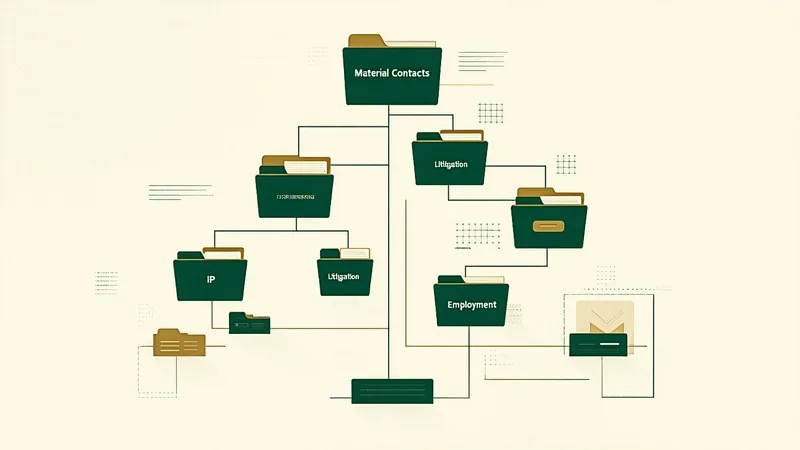
Standard VDR folder structures on Intralinks and Datasite tend to follow seller-side disclosure categories: Corporate, Financial, Contracts, IP, Litigation, HR, Real Estate, IT, Regulatory. Within "Contracts," you'll typically find sub-folders by contract type or counterparty — Customer Agreements, Vendor Agreements, Key Supplier Agreements, Employee Agreements. Some sellers organize by date; some use an unsorted "Other Agreements" bucket for everything that didn't fit neatly elsewhere.
The problem for a buy-side review team is that this structure cuts across the clause review axes that matter. Change-of-control provisions appear in customer agreements, vendor agreements, credit facilities, key employee contracts, real estate leases, and software licenses simultaneously. If your review workflow follows the VDR folder structure — assigning each folder to a different team member — you end up with fragmented clause coverage. The associate reviewing customer agreements flags the change-of-control provisions in those contracts; the associate reviewing vendor agreements may be less focused on that provision type because it's not on their explicit checklist for that folder.
An effective buy-side workflow inverts this structure: instead of organizing review by document category (as the VDR is structured), it organizes review by clause type across all document categories simultaneously. The output is a clause registry — a structured ledger of every relevant provision found, organized by clause type and counterparty, regardless of which VDR folder the document came from.
Document Classification Triage: Tier 1, Tier 2, Tier 3
Not all 300 documents in a VDR deserve equal review depth. The first task in a structured VDR workflow is classification triage: sorting documents into review tiers before detailed review begins.
Tier 1 documents are those where a material clause risk could directly affect the deal structure, closing conditions, or post-close operations. These receive full clause-level review. Tier 1 typically includes all material contracts listed in the seller's disclosure schedules, key customer and supplier agreements above a defined revenue or spend threshold, all credit and financing agreements, key employment and equity agreements, and all license agreements for IP that the acquirer has identified as essential to the business value being acquired.
Tier 2 documents are material but lower risk: routine vendor agreements below the spend threshold, standard-form employment agreements, real estate leases for non-critical facilities. These receive focused review limited to the clause types identified as highest priority — change-of-control, assignment, and indemnity caps — without full boilerplate review.
Tier 3 documents — everything else — receive a document-level pass to confirm there's nothing obviously mislabeled or misclassified, but no detailed clause review. The risk here is mislabeling: a Tier 3 document that is actually a material agreement signed under a non-obvious name, or a schedule attachment to a Tier 1 agreement filed separately in the VDR under a different folder path.
The triage decision is made by the lead associate or deal partner during the initial data room orientation — a 2-3 hour session typically held in the first 24 hours of data room access. At that point, the VDR folder index is exported from Intralinks or Datasite, and documents are classified against the agreed tier criteria before any team member begins substantive review.
Intralinks, Datasite, and Firmex: Practical Differences
The three VDR platforms used most frequently in mid-market transactions differ in ways that affect review workflow in practice.
Intralinks has historically been the standard for larger transactions and has the most sophisticated permission granularity — useful on the sell side for controlling which buyer-team members can see which documents. For buy-side reviewers, the key workflow features are bulk download (enabled by the seller's permissions), the document-level Q&A module, and the folder index export in CSV format. Intralinks's search functionality is serviceable for locating specific documents by name but is not designed for clause-level text search across the document corpus.
Datasite (formerly Merrill DataSite) has invested more in the reviewer-side experience in recent iterations. Its document classification features can surface some clause types automatically, though the output requires attorney verification before use. The platform's export and audit trail features are well-suited to post-close review documentation. The search UI is generally cleaner than Intralinks for ad hoc document location.
Firmex is common in smaller transactions and Canadian deal flow. It's lighter on automated features than Datasite but offers straightforward bulk export and clean folder navigation. For teams doing primarily manual review with structured checklists, Firmex's simplicity is often an advantage over platforms that add UI complexity without proportionate review value.
None of these platforms is designed to support systematic clause-level extraction across the full document corpus. They're disclosure platforms, not review platforms. The clause extraction work happens outside the VDR — either in the DMS where downloaded documents are organized, or in a dedicated review tool that processes the document set independently.
Integrating with iManage and NetDocuments
Most law firms handling buy-side M&A diligence use iManage Work or NetDocuments as their document management system. The VDR-to-DMS workflow is a critical handoff point: documents downloaded from Intralinks or Datasite need to be organized within the DMS in a structure that supports the clause review and redline cycle.
In iManage, the standard practice is to create a matter workspace for the transaction with a defined folder structure that mirrors the review tier classification — Tier 1 Priority Review, Tier 2 Focused Review, Tier 3 File Only — rather than importing the VDR's seller-side folder structure directly. This allows the team to organize work assignment by priority rather than by counterparty category. Redline notes and clause flags can be filed as separate documents within each workspace folder, linked to the source contract by naming convention or iManage tag.
NetDocuments provides similar workspace organization through its Matters functionality. The key difference in workflow is that NetDocuments's permission model tends to be more straightforward for cross-firm collaboration — relevant when the buyer's deal team includes both internal corporate development staff and outside counsel working in parallel on the same matter.
The redline cycle integration — taking Clauseflint's flagged clause output and feeding it into the attorneys' redline review — is a specific workflow step that benefits from planning at the outset. Clauseflint exports a structured flag report that can be imported into the DMS as a tagged document or used as the basis for a clause register spreadsheet maintained alongside the DMS workspace.
The Schedule Attachment Problem
A specific and recurring issue in VDR review is the contract that references a separate schedule, appendix, or side letter that is itself buried several folders deep — or occasionally missing from the data room entirely. The pattern: a master supply agreement that says "See Schedule 5.2(b) for term and termination provisions" where Schedule 5.2(b) is filed in a "Miscellaneous Schedules" sub-folder that wasn't included in the Tier 1 document list.
In a mid-market acquisition of a specialty chemical distribution business — approximately $55M in revenue, acquired by a regional PE-backed platform — the buy-side review identified all material supply agreements correctly during triage. What the initial triage missed was that two of those agreements contained a 90-day advance notice requirement for termination — not in the body of the master agreement, where change-of-control and termination provisions are typically located, but in a separate Schedule C that modified the base termination terms. The acquirer discovered this post-close, when a supplier invoked the 90-day notice window in response to the acquirer's attempt to renegotiate terms shortly after closing.
The lesson is that schedule attachment review is not optional in a rigorous diligence process. Clauseflint processes both master agreements and identified schedule attachments as a default — not because schedule attachments always contain material provisions, but because the cases where they do are precisely the cases where clause-by-title review of the master agreement produces false confidence.
Q&A Management and the Disclosure Bridge
VDR Q&A modules — the formalized question-and-answer process through which buyers request clarification on disclosed documents — are a parallel workflow to clause review. Questions typically arise from two sources: gaps identified during clause review (a contract is in the data room but a referenced schedule is missing), and substantive review questions that require seller confirmation (a change-of-control provision that references "prior written consent of [counterparty]" — was that consent ever obtained for prior financing rounds?).
The discipline of linking Q&A questions to specific clause flags in the review output — rather than managing Q&A as a separate standalone list — significantly improves the efficiency of the disclosure bridge process. When the deal team can trace each open question to the specific provision in the specific document that raised it, the Q&A response process is faster and the final closing checklist is more complete.
We're not saying that every deal team needs a dedicated legal project manager to maintain this linkage — that's a resource question that depends on transaction size and team structure. We're saying that building the mapping between clause flags and open disclosure questions into the review workflow from day one, rather than reconstructing it three weeks later under closing deadline pressure, is consistently the better approach regardless of whether you have LPM support or not.
Two to three business days before planned signing, the deal team should run a final reconciliation pass: every clause flag in the review output should map to either a resolved Q&A response, a disclosure schedule disclosure, a closing condition, or a "no further action required" decision with the rationale noted. Any open flag that can't be mapped is a potential issue that needs to be resolved before signatures. A deal team that has maintained a clean clause register through the diligence process can run this reconciliation in a few hours. A deal team that has managed diligence through folder-by-folder associate notes and email chains will spend significantly longer, with higher risk of something material falling through the cracks.